FFC? More like FFS.
How not to use FindFirstChild (and WaitForChild).
Does your code look like this?
-- Script in ServerScriptService
local ReplicatedStorage = game:GetService("ReplicatedStorage")

local remotes = ReplicatedStorage:FindFirstChild("Remotes")
local buyItem = remotes:FindFirstChild("BuyItem")

buyItem.OnServerEvent:Connect(function(player, itemName)
	-- ...
end)
The FindFirstChild specifically. It goes against the nature of what FindFirstChild is supposed to do. You are asking for something that might be nil, and then immediately treating it as if it definitely isn't, twice. Line 4 can hand you nil, and line 5 indexes it anyway.
And nothing here is uncertain. It's a server script, and Remotes is a folder sitting in ReplicatedStorage in the place file. The server doesn't wait for replication from anyone, so both of those are there the moment the script runs. There is nothing for FFC to protect against.
The contradiction is the whole point:
FindFirstChildexists to handle the "might be nil" case, but the code never handles nil.- The folder and the RemoteEvent are assumed to ALWAYS exist, but they're looked up as if they might not.
Either they're guaranteed, in which case FFC is pointless noise, or they aren't, in which case FFC doesn't wait for them and there's no nil check to catch it. It's the one call that's wrong no matter which way the answer falls. All it does is swap a loud error for a quiet one.
I've seen this code smell far too many times. Everything just has to be referenced with FindFirstChild. I'd get onboarded onto games and find such nonsense in almost every script. I also see it in open source code and even in yt tutorials (ahem TheDevKing). And its cousin, WaitForChild, is somehow even worse. Some people chain it five levels deep in a server script.
Genuinely, I think people are being taught the wrong things in Roblox scripting tutorials. It seems odd to me how often I come across this. Is it naturally intuitive, or is it just the way people have been taught? While doing some research about FFC, I came across a post from a user in the early stages of developing this habit after watching a tutorial.
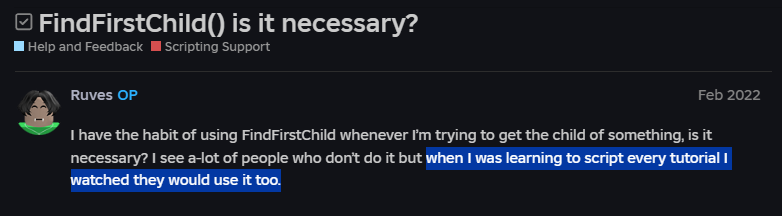
I'm ngl, I think this is a pretty big issue that affects almost every intermediate scripter. Not an issue in the "your game is broken" sense, but an issue in writing clean and meaningful code.
FFC doesn't make your code safer
People often think FFC is the "safe" way to reference something and direct indexing is risky. That's only true when FFC is paired with a nil check. Without one, FFC isn't safer, it just moves the crash somewhere less useful.
Debugging
When something genuinely is missing, direct indexing throws on the line where the problem is. Here's what that looks like for an unrelated case, a Humanoid that wasn't where the script expected:

That's a great error. It tells you what is missing, where it was supposed to be, and it points to the exact line. You solve this one of 3 ways:
- If the Instance really was supposed to be there at that moment, the bug is somewhere else. Go debug whatever failed to create it, not the line that errored.
- WFC it, if it's genuinely arriving later.
- FFC it, if it's genuinely optional, and handle the nil.
The 2 points may seem counter-intuitive to the point of this post, but WFC and FFC should always be secondary "solutions" to consider. The first question is always "why isn't it there?"
What FFC actually does to the error
Swap the direct index for FFC and the error doesn't disappear, it relocates. Take the snippet from the top, and say someone renames the folder to RemoteEvents:
local remotes = ReplicatedStorage:FindFirstChild("Remotes") -- nil, silently
local buyItem = remotes:FindFirstChild("BuyItem") -- attempt to index nil with 'FindFirstChild'
The direct-index version would have said Remotes is not a valid member of ReplicatedStorage. Instead you get attempt to index nil with 'FindFirstChild', which no longer tells you which child was missing or where it was supposed to live. You've traded a precise error for a vague one and gained nothing. The example given is a simple one, but in larger codebases, this may be caused due to a singular FFC within a module that isn't even related.
The same goes for WaitForChild without a timeout. It doesn't fail, it hangs. The script stops at that line forever and everything after it never runs, with only an "Infinite yield possible" warning to show for it.
It is also worth noting that if you are debugging/fixing this error with an LLM, then it may search deep and not find the root cause being due to an FFC. It will find workarounds and write edge cases to resolve the issue.
So when is something "always there"?
This is where experience and knowledge come in useful. As a beginner, it is natural to reach for FFC or WFC just in case. But to know when you can trust it, you need to understand replication on Roblox.
When a player joins, they get their own copy of the game. The server has its copy, and every client has theirs. Whenever the server changes something (creates a part, moves it, changes a property), it sends that change to every client so their copy stays in sync. That's replication. It's also why changes made from a LocalScript don't show up for anyone else. You're editing your own copy, and the client doesn't have permission to push that back to the server (network ownership of unanchored parts aside).
LocalScripts in the usual containers (StarterPlayerScripts, StarterCharacterScripts, StarterGui, StarterPack) don't start running until the initial copy of the game has been sent over. By the time your code runs, everything that was saved in the place file is already sitting there.
Which means that if you've referenced a ScreenGui Instance, you can assume all of its children are there. And if your LocalScript is inside that ScreenGui, naturally the same applies.
On the server it's even simpler. The server is the source of truth, it doesn't wait for replication from anyone. You should almost never need WaitForChild in a server script for something that's in the place file.
When you actually need to wait
There are real cases where you need WaitForChild and FindFirstChild, and they all have one thing in common: the instance does not exist yet when your code runs.
ReplicatedFirst. LocalScripts in there run before the game has loaded. That's the entire point of the container (loading screens and such). Anything outside ofReplicatedFirstisn't guaranteed to be there yet, so you wait for it. Stuff insideReplicatedFirstitself is fine to index directly.- StreamingEnabled. With streaming on, the workspace is sent to the client in pieces based on where the player is. A model on the other side of the map may not exist on your client at all. Anything under
workspacebecomes a wait-for case. (Other containers likeReplicatedStoragearen't affected by streaming.) - Anything the server created at runtime. If the server clones a model from
ServerStorageinto the workspace, the client receives it over time. The model can show up before all of its descendants do. This one bites people the most, becauseChildAddedfires and they immediately index into the model.
The only ordering guarantee replication gives you is parent before child. An instance never appears on a client without its parent already being there. Siblings get no such promise. They arrive when they arrive.
That last part is worth sitting with, because it kills an assumption that feels obviously true: "my LocalScript is inside the model, so the model must be fully loaded." It isn't. Your script is just one more child, racing its siblings.
The character
The player's character is the runtime case everyone hits. It's rebuilt on every respawn. From StarterPlayerScripts, waiting is clearly correct:
local Players = game:GetService("Players")
local player = Players.LocalPlayer

player.CharacterAdded:Connect(function(character)
	local humanoid = character:WaitForChild("Humanoid")
	-- ...
end)
From StarterCharacterScripts it's tempting to think you're safe, since the script gets cloned into the character after the server has built it. On the server, that's true. A Script in there can index script.Parent.Humanoid directly, because the server never waits on replication for anything.
A LocalScript in there is a different story. The server assembles the character, then the whole thing replicates to the client piece by piece, and the script is just one of those pieces. It can start running before Humanoid has landed.
If you're not convinced, look at what Roblox ships. Animate and Health both live in StarterCharacterScripts, and both of them wait:
-- Animate, straight out of the default character
local Figure = script.Parent
local Humanoid = Figure:WaitForChild("Humanoid")
Compare that to a LocalScript inside a ScreenGui in StarterGui, which is safe. The difference is the mechanism. StarterGui contents come from the place file, so they're already fully on the client by the time anything runs.
Back to the first snippet
Which is the same verdict the opening example gets, for a much more boring reason. A folder in ReplicatedStorage read from a server script. Nothing to wait for. Resolved code:
local ReplicatedStorage = game:GetService("ReplicatedStorage")

local buyItem = ReplicatedStorage.Remotes.BuyItem

buyItem.OnServerEvent:Connect(function(player, itemName)
	-- ...
end)
If that ever errors, the folder genuinely isn't there.
When FFC is the right call
FFC isn't a bad function. It's a bad default. It's the right tool whenever "not there" is an expected outcome and you have something to do about it.
One thing that's actually cool about FFC, (but still not recommended) is that you can index children that are names of properties such Name, Size, etc... It often occurs tat UI designers name their labels Name and you're just hella lazy and go for a FindFirstChild("Name"). I have mixed feelings on this one.
Names with spaces or weird characters aren't an FFC case btw. workspace["Spawn Point"] works perfectly fine.
Even AI does it
What shocked me most was that AI has picked up on this habit. Yes, while vibecoding a game, Claude Opus 4.7 was using FFC to reference Instances that are 100% there. What makes this worse is that it was being done in a RenderStepped. So, every single frame, it was searching for the same child it found the frame before.
Makes sense when you think about it. AI learned from the same tutorials and open source code as everyone else. If most of the Luau on the internet spams FFC, the model will too. Garbage in, garbage out.
There's no real need to get into detail with the benchmarks, but to make things a lot worse, Roblox had to come out with a statement on their docs to indicate that FFC takes 8x longer than indexing. iirc, this statement has been there for a few years and AI seems to not have prioritized it.
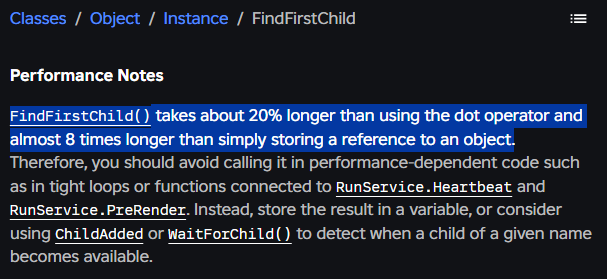
But in all honesty, what does 8x of referencing an instance actually change? 8x of "almost nothing" is still almost nothing. Do it once at the top of a script and you'll never measure it. It only starts to matter when it's in a hot path, which is exactly the case above: a per-frame loop, 60+ times a second, forever.
So performance isn't really the argument here. Clarity is. The 8x is just a bonus you get for free once you stop looking things up you already have.
And the real fix for the RenderStepped case isn't even "use direct indexing instead". It's to stop looking things up every frame at all. Grab the reference once outside the loop.
But I'd personnaly say tt is certainly worth looking through the code to eliminate these as a first-pass optimization.
Credit to this video for a great breakdown of the replication side of this, it's about WaitForChild but the same logic applies.